
Copy galleries created before version 7 with images
To copy a gallery with images created before version 7 update you need two accomplish this two steps:
First step:
Increase max execution time in your server configuration files.
If your server use .htaccess then put this complete command at the bottom of the file:
<IfModule mod_php5.c>
php_value max_execution_time 3600
</IfModule>
(Don’t forget to take the command out after the gallery is copied)
If your server use php.ini then put this command at the bottom of the file:
max_execution_time = 3600
(Don’t forget to take the command out after the gallery is copied)
Note: Some server provider does not allow to change to change max_execution_time . You have to ask them if they could do for you an exception. If your gallery has many images you will need definetly to increase max_execution_time to copy the gallery.
Second step:
Analyse the “Copy” button with developer tools (Open with shortcut Command+Option+I for Mac or F12 for PC) of your browser.
Then remove the disabled attribute from the hidden field with name “copy_v7”
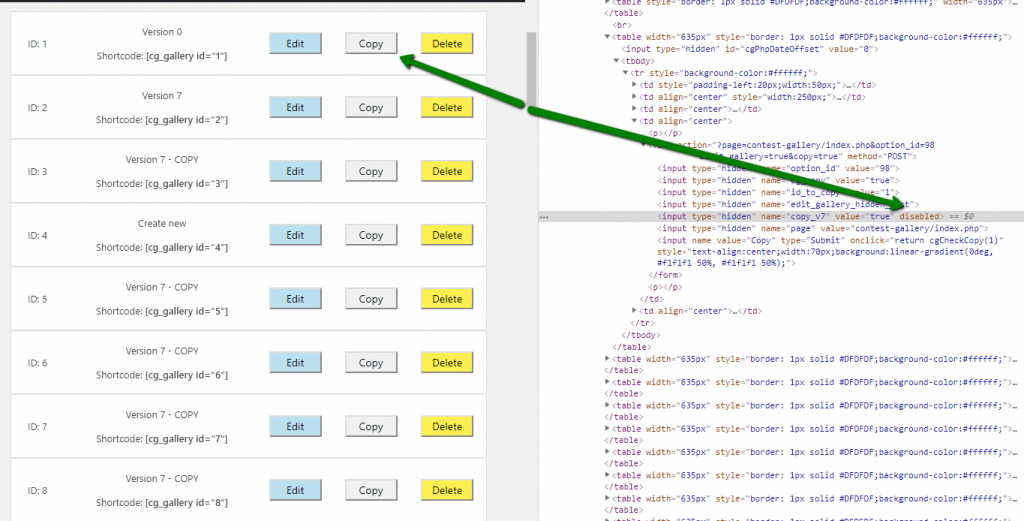
Ready for copying
Now configuration is done and you can click “Copy” to copy the gallery with images. Maybe it takes a while till all images are copied.