Contest Gallery documentation
Contest Gallery shortcodes
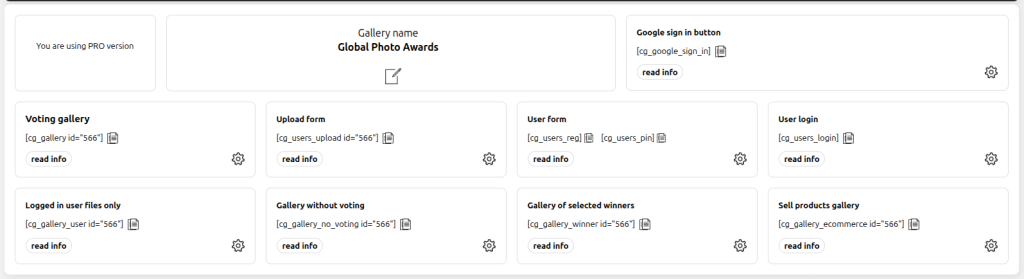
Select the shortcode for a gallery, participant account, upload workflow or ecommerce page.
Gallery shortcodes
[cg_gallery]Main public gallery with the configured voting and comment behavior.
[cg_gallery_user]Entries associated with the logged-in participant.
[cg_gallery_no_voting]Gallery display without voting interaction.
[cg_gallery_winner]Winner-focused gallery configuration.
[cg_galleries]Click-through selection of multiple galleries.
Upload and account shortcodes
[cg_users_upload id="123"]Frontend upload form for gallery 123. Replace the example with the gallery ID shown in the backend.
[cg_users_reg]Standard registration form. The user confirms registration through the link in the registration email.
[cg_users_pin]Email-PIN registration. The user confirms the emailed PIN on the same page without a page reload.
[cg_users_pin mode="access"]Passwordless account access. Existing users sign in with the emailed PIN; a new email address creates a minimal account after confirmation.
[cg_users_login]WordPress user login form with the configured lost-password behavior.
[cg_google_sign_in]Google Sign-In button using the web client configured under the Google Sign-In options.
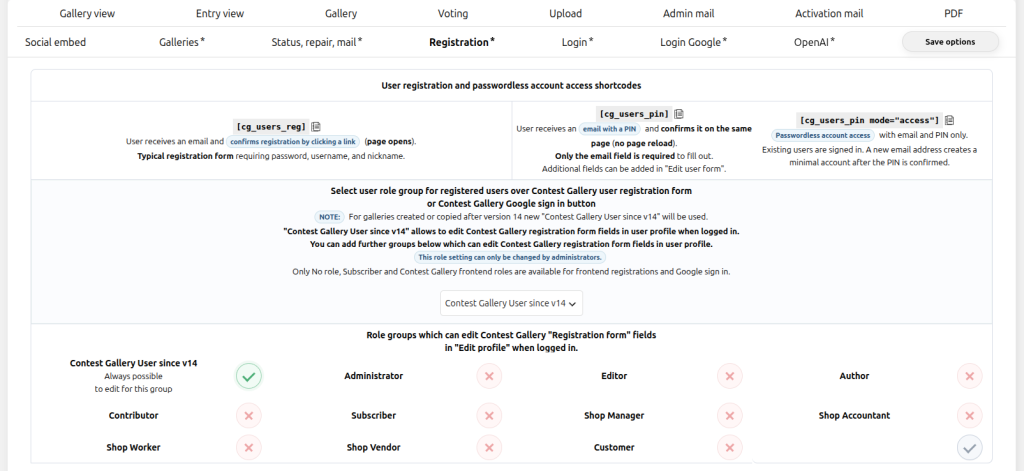
For galleries created or copied in version 14 or newer, registration, PIN, login and Google Sign-In settings are global. These account shortcodes do not require a gallery ID. The upload shortcode still uses its gallery ID.
Ecommerce shortcodes
[cg_gallery_ecommerce id="123"][cg_order_summary]Use test="true" on the ecommerce gallery shortcode when testing the configured sandbox environment.
Copy from the current gallery
The gallery backend remains the authoritative source. Copy the generated shortcode from the current gallery rather than typing it from memory.