Reach the whole gallery
Send an update to the people who submitted entries, including guest uploaders with a saved email address.
Participant emails and notifications
Send contest updates, enable useful notifications and review recorded emails. Bring participant communication into your WordPress gallery workflow.
Keep your contest moving with updates sent from the gallery backend. Announce that voting has opened, explain a deadline change or congratulate the winners. Start with every reachable participant in one gallery, then narrow the audience when your message applies to a smaller group.
Send an update to the people who submitted entries, including guest uploaders with a saved email address.
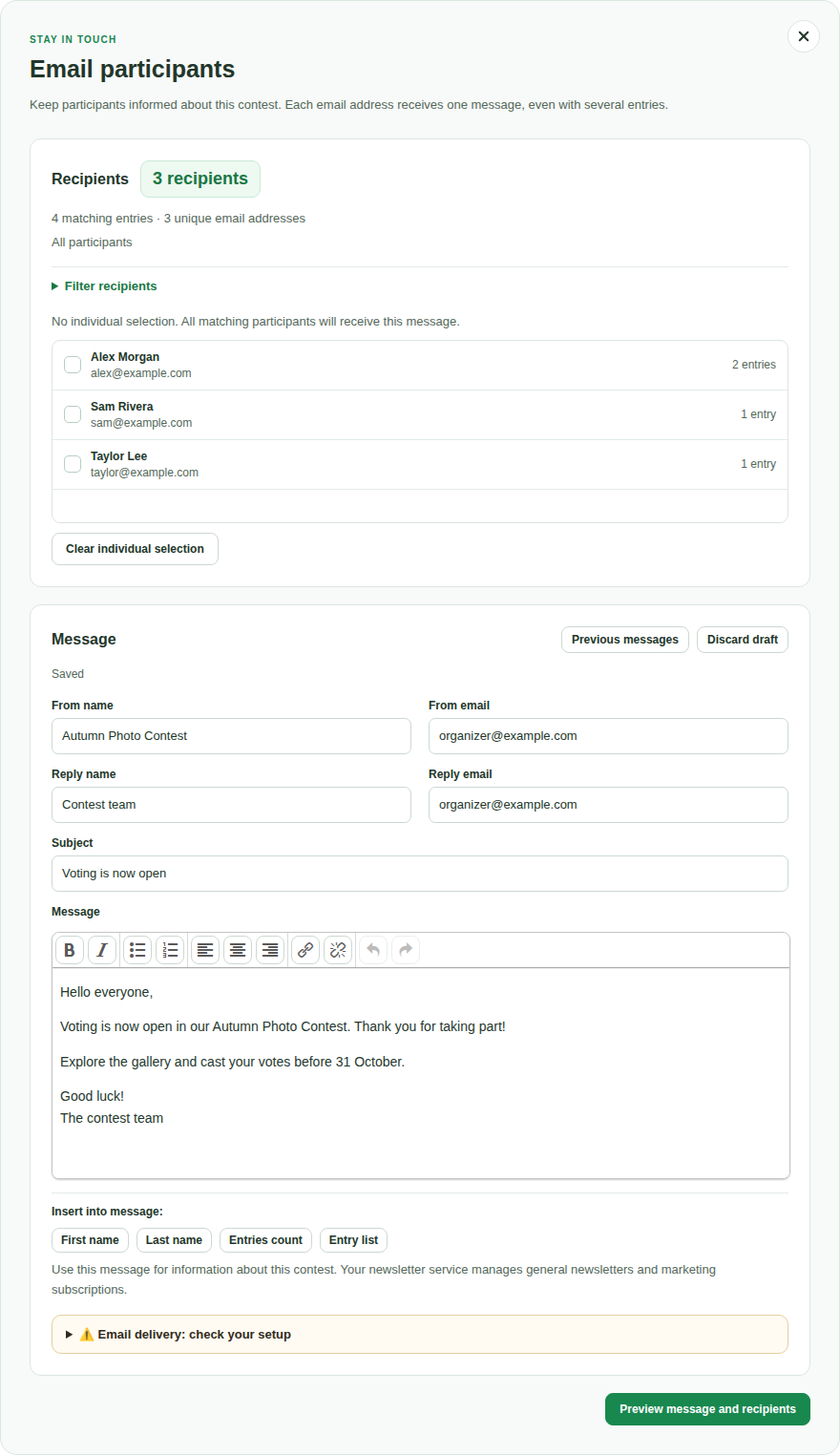
Filter by entry status, winners, category or participant. Select individual addresses for a more specific message.
Each email address receives one message per mailing, even when that participant has several matching entries.
The recipient list shows matching entries and unique email addresses before you send. Registered contributors use their current WordPress account address. Uploads without an account use the saved upload email field. Entries without a valid address cannot be included. The mailing is based on submissions to this gallery, rather than a list of everyone who has visited or voted.
Write a subject and formatted message, choose the sender and reply address, and return to your saved draft when you are ready. Previous messages can become a new draft. Check the recipients again before sending the new message.
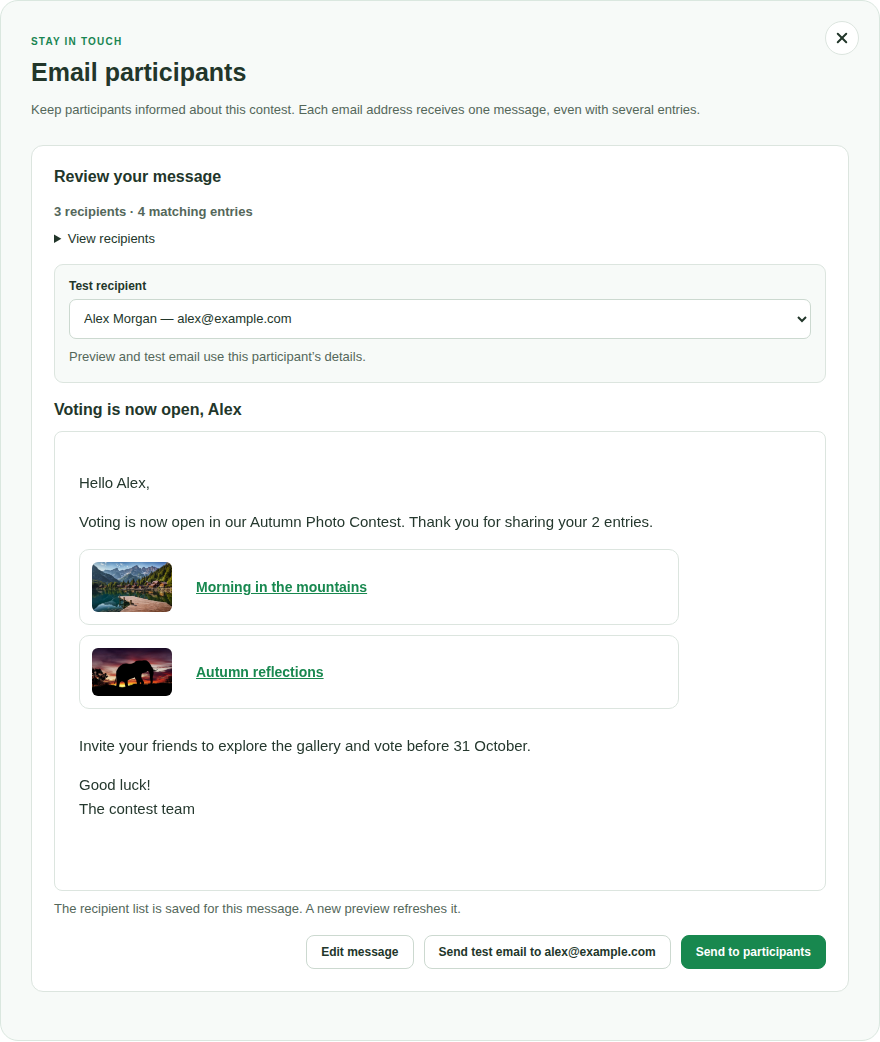
Open Preview message and recipients to review the message and its saved recipient list. Send a test to your own account first. You can also select a participant in the test-recipient menu to inspect their personalized version. The test button names the address that will actually receive that test.
After you choose Send to participants, sending continues in small background batches. You may close the dialog and return to the progress later. Use Stop sending to stop the remaining work. Retry failed recipients is available for clearly failed attempts. An interrupted attempt with an unclear outcome is not retried automatically.
Delivery timing depends on WordPress Cron and your mail service. “Accepted by mailer” means that the sending system accepted the message. It does not prove that the message reached the inbox or was read.
PRO adds four personalization placeholders to participant mailings: first name, last name, the number of matching entries and an entry list. A single message can greet each person and show the entries included in your recipient selection.
The entry list can include small thumbnails, titles and links to published entry pages. An entry without a published target page appears without a link. Name placeholders use available account details, so check the preview when a participant has no stored first or last name.
Participant mailings are messages you start yourself. Event notifications respond to a configured action, such as an upload, registration or new comment. Choose the email types your workflow needs and review their individual settings.
| Email type | What it helps you do | Where to configure it |
|---|---|---|
| Registration and email PIN | Confirm registration and provide one-time PIN access. | Registration and login email settings |
| Password reset | Help an existing account regain access. | Password reset email settings |
| Successful frontend upload | Confirm receipt of the submitted entry. This is separate from publication. | Upload options · PRO |
| Entry activation | Notify the contributor when an entry is activated, with a configured entry link. | Activation email · PRO |
| New uploads and contact messages | Send submitted information to the configured administrator address. | Admin email options · PRO |
| Comments | Notify the administrator about new comments or the contributor about comments on their entries. | Comment email options · PRO |
| Votes | Notify the contributor about voting activity on their entries. | Vote email options · PRO |
| Private messages and friend requests | Bring members back to their conversations and requests. | Member notifications · FREE and PRO |
| Orders | Send the buyer a confirmation in the configured ecommerce workflow. | Ecommerce email settings |
Upload receipt and entry activation are different steps. A receipt can tell someone that their submission arrived while it is still waiting for review. The activation email tells them that the entry has been made available.
Message and friendship notifications are optional. Message notifications are grouped until the member reads the conversation. Both editions can enable these notifications. PRO allows their subjects and contents to be edited, including an optional message-preview placeholder.
Use the existing guides for upload and activation, registration and PIN access, member messaging and ecommerce setup.
Use the existing backend email actions for a personal reply or an entry-specific message. The individual email composer has its own saved templates. This is useful when one contributor needs additional information or a different explanation.
For a participant mailing, select one or more recipient addresses in Email participants. Its saved drafts and Previous messages help you continue or reuse your writing. The separate individual-email template collection is not a template selector in the participant mailing dialog.
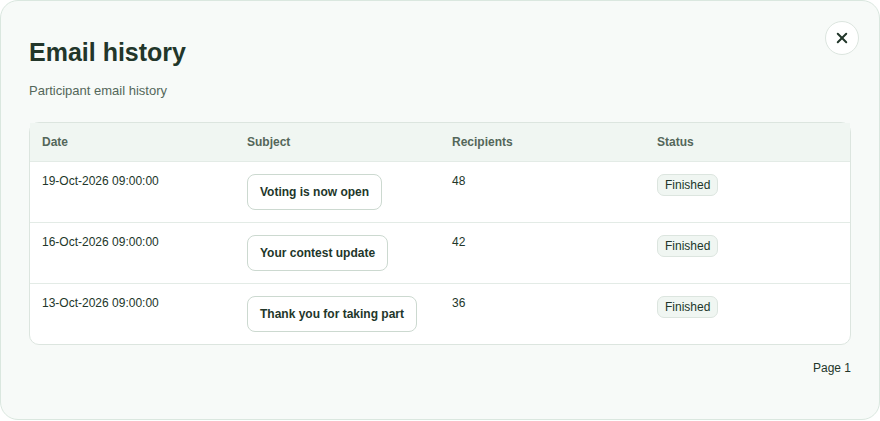
The gallery’s Email history keeps started participant mailings together. See the date, original subject, recipient count and status. Open a mailing to inspect its original message and recipient list, then select an address to view that recipient’s saved version.
Administrators can also open Email history from the registered-user list. This view brings together available recorded Contest Gallery emails for that account across galleries on the same website. It can include individual, activation, registration/PIN and participant emails, plus available comment and vote notification records.
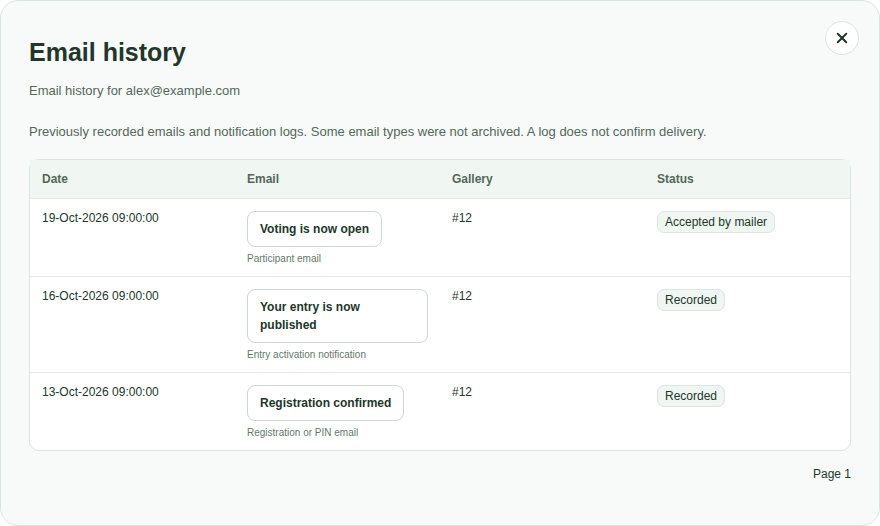
The user view is not a complete archive of every email WordPress sends. Community notifications, password-reset messages, order emails and some upload messages are not part of this archive. Older records may lack their original subject or headers. A saved record does not establish delivery.
The main participant mailing workflow and both history views are included in FREE and PRO. Upgrade when you need personalized participant messages or the additional configurable notification workflows.
| Capability | FREE | PRO |
|---|---|---|
| Participant mailings and recipient filters | Yes | Yes |
| Preview, test email and background sending | Yes | Yes |
| Saved drafts and reuse of earlier mailings | Yes | Yes |
| Gallery mailing history | Yes | Yes |
| User email history for administrators | Yes | Yes |
| Names, entry counts and entry lists in participant mailings | No | Yes |
| Enable message and friendship notifications | Yes | Yes |
| Edit member notification subjects and contents | No | Yes |
The full FREE/PRO comparison also covers the existing upload, activation, comment and vote notification options.
Before your first mailing, use the email setup test to check the sending configuration. It sends a neutral test message. The test in the review step sends your actual participant message. These tests serve different purposes.
Yes, when their entry has a valid saved email address in the upload form. Entries without a usable address cannot receive an email.
No. Participant mailings select reachable people through gallery submissions. Voting or registering without a submission does not automatically add someone to this gallery’s recipient list.
The current workflow starts when you choose Send to participants. It does not provide scheduled campaigns or automatic follow-up sequences. A deadline reminder is a message you prepare and start yourself.
Use participant messages for information about this contest. General newsletters, marketing subscriptions and subscription management belong in your newsletter service.
Contest Gallery uses the WordPress mail system, including your configured SMTP or mail plugin. Check the sender address supported by that service. Reply-To controls where replies go and may differ from the sending address.
No. It shows the available saved record and sending status. It does not provide inbox confirmation, open tracking or read receipts.
Build your gallery, collect submissions and keep contributors informed from the same WordPress workflow. Start with the participant mailing tools in FREE and add PRO personalization when it helps your contest.