
Contest Gallery guides
Friends and member connections
Add friends and friend requests to your WordPress community
Let members choose their connections and stay in control of contact.
Give members a reason to connect
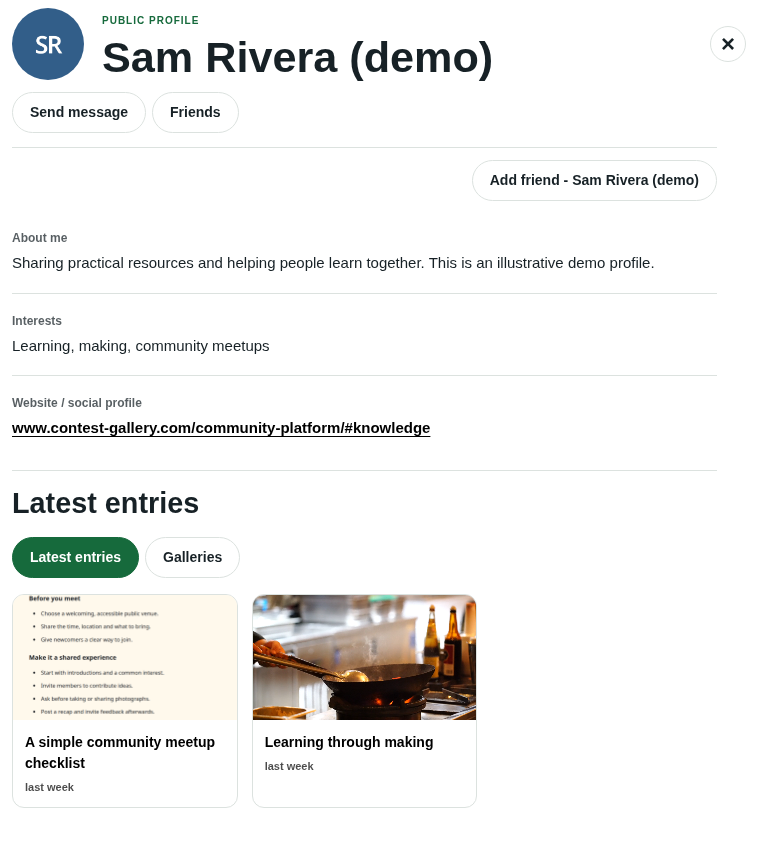
A contribution can introduce someone before a conversation starts. Members browse photographs, videos or useful resources, open the contributor’s public profile and explore their public information and published work.
Friendship requests turn that discovery into a confirmed connection. They are part of the core member experience in FREE and PRO.
Enable friends on your WordPress website
- Use a modern gallery with Member profile enabled.
- Open Member notifications (general) and enable Contact and friendships when your community should offer social actions.
- Configure public fields and member sign-in for the gallery experience.
- Choose whether new friendship requests should send an email notification.
- Explain where members can find Friends in their own member area.
How a friendship request works
- A member signs in and opens the other person’s available public profile.
- They select Add friend to send a request.
- The recipient reviews the incoming request in Friends and accepts or declines it.
- Once confirmed, the connection appears among the member’s accepted friends.
An outgoing request can be withdrawn. An accepted friendship can be removed later. Opposite requests do not silently accept each other, so the member keeps control of confirmation.
Keep friends and messages distinct
The Friends action opens confirmed friends. Send message opens a private conversation. A friendship is not required to start a conversation from an available profile, provided the contact rules permit it.
The member area keeps Messages and Friends in separate tabs. An email notification can bring a member back to the relevant area after sign-in.
Let members and administrators manage contact
A member can block another person. Blocking prevents new messages and friendship requests in both directions and removes their friendship. The conversation history remains available. Unblocking allows contact again without recreating a previous friendship.
Administrators can review conversations and disable a user’s ability to send new messages and friendship requests. These controls are separate from public entry moderation.
Friendship questions
Can guests send requests?
Guests can browse available public profiles. Sending friendship requests and exploring confirmed friends requires sign-in.
Are messages restricted to confirmed friends?
No. Friendships and message permission are separate decisions. Available profiles, contact rules and blocking determine the contact path.
Can the operator disable social functions?
Yes. Turning off Contact and friendships preserves existing conversations and friendships while removing the social actions from the enabled frontend experience.
Can I customize request notification emails?
Both editions can enable the standard notification emails and configure sender information. PRO lets you edit the notification subject and content.
Connect friendships with profiles and contributions
Follow the community setupHelp members discover contributors