
Contest Gallery guides
Participant directories
Create a WordPress member directory for gallery contributors
Help visitors discover contributors through their public information and published entries.
Create a directory around visible contributions
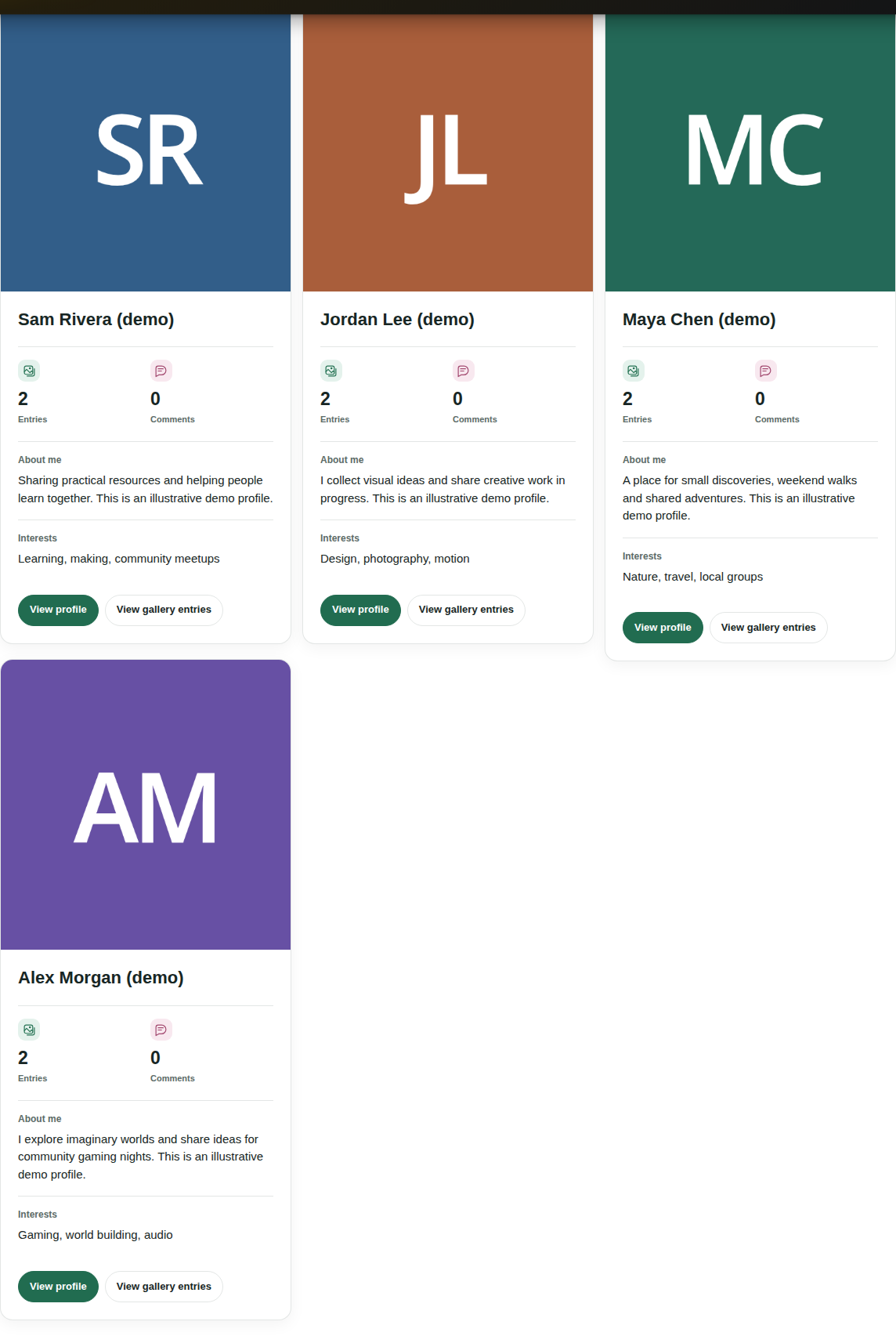
The Participants view helps visitors discover the people behind gallery entries. It shows contributor cards with names, profile images, selected public information and links to profiles or gallery entries.
This is a contributor directory. It is built from published entries that the viewer is allowed to see. An account with no visible published contribution does not appear in that gallery’s participant list.
Set up the participant view
- Choose a gallery created or copied with version 24 or later, keeping its generated gallery page.
- Enable Member profile for the relevant normal or no-voting gallery view.
- Choose the fields that belong on public profiles in the general registration form.
- Use member-associated uploads so each published contribution has a WordPress owner.
- Publish approved contributions and open Participants from the gallery.
Choose useful information for discovery
A display name and recognizable image make the list easier to browse. Optional fields such as an introduction, interests or a website link can help visitors find a relevant contributor.
The participant search includes names and enabled public profile information. Private registration fields are excluded. Keep public fields focused on what your community actually wants to share.
Separate the public profile from gallery entries
View profile opens the member’s public profile. In version 34.0.1 it brings together accessible published contributions across eligible galleries. Latest entries and Galleries help visitors explore that work.
View gallery entries opens the person’s contributions in the current gallery. The directory, full profile and gallery-specific entry view therefore provide different routes to the same contributor.
Use supported multi-gallery overviews
Participant directories are also available from supported normal and no-voting multi-gallery overview views. This gives a community with several collections another way to discover contributors.
The source galleries still control which entries and profiles are available. Restricted or unpublished content does not become public just because it belongs to a member in another gallery.
Add social actions when members want to connect
From a public profile, signed-in members can send a message or request a friendship when the community setting is enabled. The directory helps discover people. Confirmation and blocking still belong to the member’s own decisions.
Member directory questions
Can I list every WordPress account without a contribution?
The Participants directory is contribution based. It does not provide a general public list of all registered WordPress accounts.
Why is a contributor missing?
Check for a visible published entry owned by that member, the gallery’s Member profile setting and the source gallery’s visibility rules.
Can guests explore the directory?
Guests can explore it when the gallery and profiles are publicly available. The source gallery’s access rules continue to apply.
Does the directory make each profile a separate Google landing page?
The feature pages and guides on this website are searchable content. The public member experience uses the gallery’s profile views and modals. Do not assume that each modal becomes an independently indexed member page.
Build a community around the directory
Set up your WordPress community
Explore the live contributor demo to see how cards, profiles and entries work together.